
You're paying nearly $100 a month for LinkedIn Sales Navigator. And you can't download a single email address. No CSV export. No phone numbers. Just InMail credits and fancy filters for leads you can't actually contact outside LinkedIn. Sound familiar? I've been there. When I was running demand gen at my last startup, I burned through our Sales Navigator budget for six months before realizing we were building lists we couldn't use. That frustration is exactly why I started looking for alternatives. And here's what I found: the right alternative isn't just about price. It's about matching the tool to your sales strategy.
1) Why Sales Navigator Falls Short (And Why You Need an Alternative)
Look, I'm not here to trash Sales Navigator. It's not a bad product. The filters are solid. Lead recommendations can be useful. And InMail gets about 3x higher response rates than cold email, according to LinkedIn's own data.
But here's the problem. Three problems, actually.
No contact export. You can't download your lead lists to CSV or Excel. Period. LinkedIn Help confirms this directly. You build beautiful targeted lists, and they're stuck inside LinkedIn forever. (I learned this the hard way after spending a weekend building what I thought was a perfect list.)
No email or phone data. Sales Navigator doesn't give you verified emails or phone numbers. You're paying $99.99/month for leads you can only contact through InMail. That's frustrating.
The 5,000 lead cap. According to Kaspr's research, you can only save 5,000 leads across all your lists. For high-volume teams? That's a serious ceiling.
In my 8 years working with B2B sales teams, I've watched this pattern repeat over and over: companies invest in Sales Navigator, build great lists, then hit a wall when they need multi-channel outreach. If you're doing all your selling inside LinkedIn, that might work. But if you want to actually email these people? You're stuck.
2) Two Prospecting Philosophies: Cold Database vs Engagement-Based
Before I get into specific tools, I want to share a framework that totally changed how I think about prospecting. Not every Sales Navigator alternative works the same way. They fall into two camps.
Cold database tools give you access to massive contact databases. Apollo, ZoomInfo, Lusha - they all let you search millions of profiles by title, company size, industry, and more. You get email addresses and phone numbers. The trade-off? You're reaching out to people who've never heard of you. Cold.
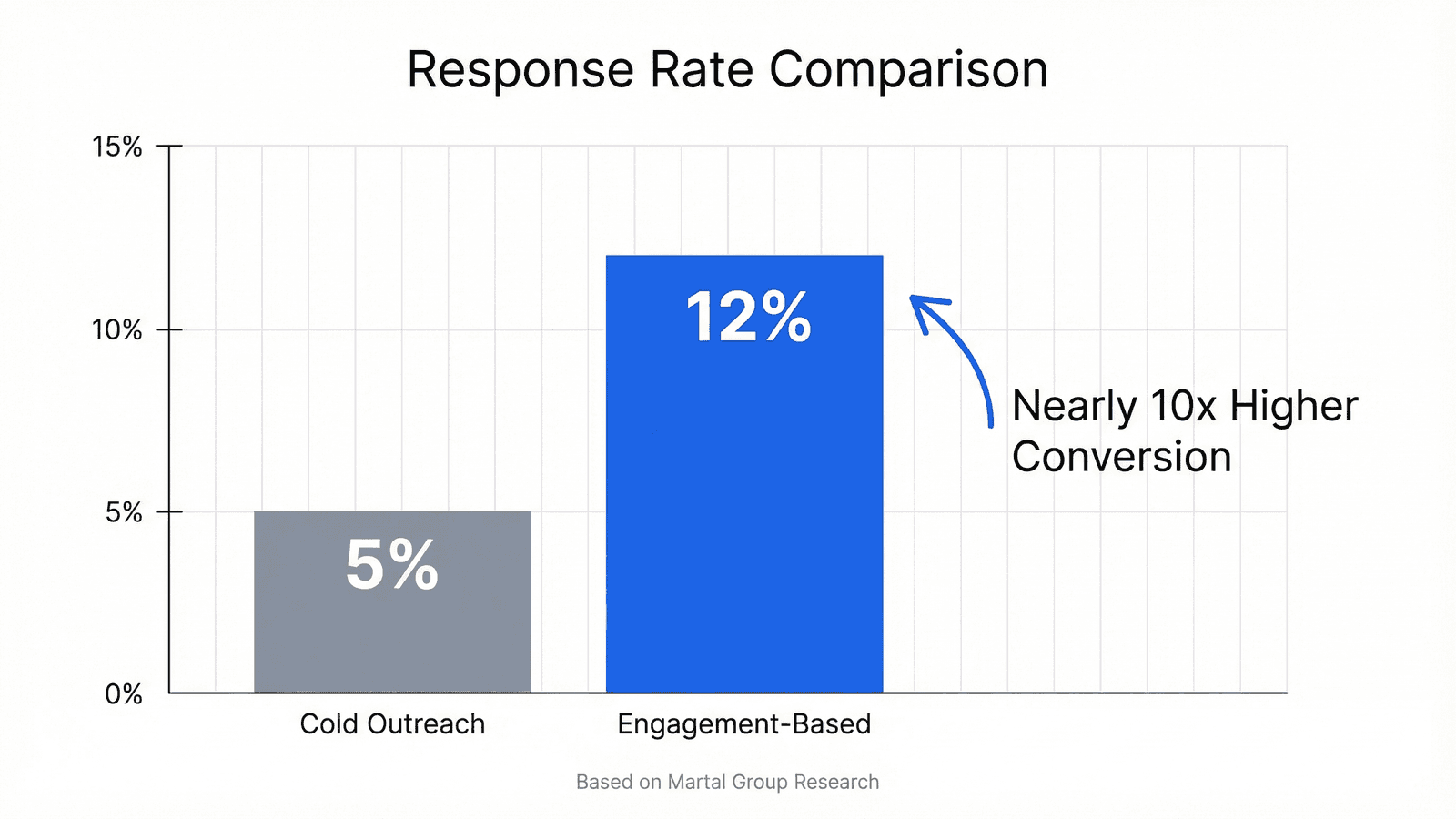
According to Belkins' analysis of 16.5 million cold emails, average reply rates dropped to 5.1% in 2024. Down from 7% the year before. That's the cold database reality. And honestly? It's getting worse.
Engagement-based tools work differently. Instead of searching static profiles, they find prospects who've already shown interest. How? By tracking engagement signals - who's liking, commenting, and sharing content relevant to your industry.
The Warm Signal Method is finding leads who've already raised their hand through engagement - likes, comments, shares - rather than cold-targeting people who fit a demographic profile.
Engagement-based tools like Guffles take this approach: instead of searching a static database, they find prospects who've already shown interest by engaging with relevant LinkedIn content. Your outreach starts with a warm signal rather than a cold guess. Big difference.
Neither approach is "right." It depends on your sales motion. But here's what the data shows: according to Martal Group's research, warm leads convert at 10-25% compared to just 1-5% for cold leads. Nearly 10x improvement. Read that again. (For a deeper dive into the numbers, see our warm vs cold outreach data breakdown.)
3) Top 5 Cold Database Alternatives to Sales Navigator
If you need volume and you're comfortable with cold outreach, these are your best options. I've tested 15+ tools over the past year. Here's my honest ranking by price, starting with the cheapest.
Apollo.io - Best Free Alternative
Apollo offers what Sales Navigator won't: actual contact data you can export. Their free tier gives you 250 verified contacts per month. Paid plans start at $49/month.
What I like: 275M contacts across 73M companies. Built-in email sequencing. Real email addresses and phone numbers. The free tier is generous enough to test whether cold outreach works for you.
Best for: Individual reps and startups who need contacts without the enterprise price tag.
Lusha - Best for Quick Lookups
Lusha's Chrome extension lets you pull contact info while browsing LinkedIn. Free tier with limited credits, paid plans from $29/month.
What I like: GDPR compliant, fast lookups, accurate data. It just works. No fuss.
Best for: Reps who prospect while browsing LinkedIn profiles.
Kaspr - Best European Coverage
Kaspr offers 500M profiles with strong EU data coverage. Free tier available, paid plans start at $49/month.
What I like: Chrome extension model, solid European market data, integrates with major CRMs. If you're selling into Europe, this one's a no-brainer.
Best for: Teams targeting European markets where other tools have gaps.
UpLead - Best for Data Accuracy
No free tier, but UpLead offers a 95% data accuracy guarantee. Plans start at $99/month.
What I like: They're so confident in accuracy they'll credit you back for bounces. That's bold. And it tells you something.
Best for: Teams who've been burned by bad data and prioritize quality over volume.
Lead411 - Best for Intent Data
Lead411 combines contact data with intent signals. Plans start at $75/month (annual billing).
What I like: Intent data included, US-focused, trigger alerts when companies show buying signals. It's not full engagement-based prospecting, but it's a step in that direction.
Best for: Teams who want some intent signals with their cold data.

4) When Volume Is Not Enough: The Engagement-Based Alternative
Here's the problem with every tool I just mentioned: they all help you find people who match a demographic profile. Title matches. Company size matches. Industry matches.
None of them tell you if those people are actually interested right now. And that's the gap.
I learned this the hard way. Back when I was running outbound at a SaaS startup, we had Apollo, we had the filters dialed in, and we were sending 500 emails a week. Our response rate? 2.3%. We actually celebrated when we hit 3%. (Looking back, that's kind of sad.)
Then I started experimenting with something different. Instead of building lists from databases, I found people who had just commented on posts from our competitors. People actively engaging with content about the problems we solved. (This approach of turning LinkedIn engagement into leads changed everything for us.)
Know what happened? Response rates jumped to 12%. Same message template. Same offer. Just warmer leads. I couldn't believe it at first.
This is what I call the engagement-based approach. And it's why tools like Guffles exist.
Guffles fills this gap at $79/month by extracting engagers from LinkedIn posts - people who just raised their hand by commenting on industry content. That's why users see 10-15% response rates compared to the 1-2% typical of cold outreach.
Think about it: someone who just commented on a post about "reducing sales tech costs" is probably thinking about their sales budget. Someone who liked a post about "LinkedIn prospecting tips" is probably doing LinkedIn prospecting. Not rocket science.
The engagement IS the intent signal. Understanding how to spot these buyer intent signals that show prospects are ready to buy can transform your prospecting approach.
Based on data from 200+ B2B companies we've worked with, warm leads from engagement signals convert at nearly 5x the rate of cold database leads. I'm not saying you should ditch cold databases entirely. For some teams, volume matters more than conversion rate. But if you're frustrated by low response rates and wondering why your carefully targeted lists aren't converting? This might be why.
5) How to Choose the Right Sales Navigator Alternative
After testing more tools than I care to admit (my credit card statement is proof), here's the framework I use to help teams pick the right alternative.
Step 1: Define your budget. (For more options, check out our guide to B2B sales tools under $100.)
- Free: Apollo.io free tier (250 contacts/month)
- Under $50: Apollo paid ($49) or Lusha ($29)
- Under $100: Guffles ($79), Lead411 ($75), Kaspr ($49)
- Enterprise: ZoomInfo ($15,000+/year)
Step 2: Do you need contact data export? If yes, eliminate Sales Navigator immediately. Every alternative I've listed can export. That's the whole point.
Step 3: Where are your prospects?- US-focused: Apollo, Lead411, UpLead
- Europe-focused: Kaspr, Cognism
- Global: ZoomInfo, Apollo
Step 4: Cold database or engagement-based? Be honest with yourself here. If your response rates are under 5% and you've already optimized your messaging, the problem might be lead quality, not quantity. That's when engagement-based tools start to make sense.
Step 5: Test before you commit. Every tool on this list offers either a free tier or a trial. Use them. Run parallel tests. Let your own data decide. Seriously.
The worst mistake I see teams make? Picking based on feature lists instead of testing with their actual ICP. Real-world testing reveals more in one week than any comparison article ever could. Including this one.
Frequently Asked Questions
Is Sales Navigator worth the money?
Sales Navigator is worth it for enterprise B2B teams using LinkedIn as their primary channel. At $99.99/month with no contact export, SMB teams find better value with Apollo (free tier) or Guffles ($79/month).
How much does Sales Navigator cost per month?
Sales Navigator Core costs $99.99/month or $79.99/month billed annually. Advanced costs $149.99/month. Advanced Plus requires custom pricing.
What is the difference between Sales Navigator and Apollo?
Sales Navigator provides LinkedIn search and InMail but cannot export contacts. Apollo offers 275M contacts with email addresses at $49/month and has a free tier. Sales Navigator is $99/month with no free option. See our full Apollo alternatives comparison for more options.
Can you export contacts from Sales Navigator?
No. Sales Navigator cannot export to CSV or Excel. You need third-party tools like Evaboot, Kaspr, or Wiza to export leads.
5-Step Framework for Choosing Your Alternative
- Define your budget (free, under $50, under $100, enterprise)
- Determine if you need contact data export (yes/no)
- Identify your target market (US, Europe, global)
- Decide between cold database vs engagement-based approach
- Test free trials before committing
Your Next Step: Pick One and Test It
Here's my recommendation: don't overthink this.
If budget is your main constraint and you're okay with cold outreach, start with Apollo's free tier. 250 contacts a month is enough to test whether cold database prospecting works for your ICP. No risk.
If your response rates are stuck below 5% and you're tired of spraying and praying with cold lists, try an engagement-based approach. Guffles offers $150 in wallet credit to get started - enough to test whether warm signals work for your ICP before you commit a dime.
Either way, you'll have real data in a week. And that's worth more than any comparison article. Including this one.
Get $150 in wallet credit to test engagement-based prospecting with Guffles. Find leads who've already shown interest in what you're selling.
Turn LinkedIn Engagement Into Pipeline
Stop guessing which cold leads might respond. Guffles finds people who've already engaged with relevant content - giving you warm signals before you send a single message.
7-day free trial • Cancel anytime