
Here's something that took me way too long to figure out: LinkedIn users decide whether to accept your connection request before they even finish reading it. I'm talking 3-7 seconds. That's it. Frustrating, right?
I've sent thousands of connection requests over the past 8 years. For a long time, I obsessed over the perfect LinkedIn connection request message. The right words. The ideal length. The perfect opening line.
Then I analyzed the data from Expandi's 2025 LinkedIn Outreach Report, based on 20+ million outreach attempts. I was focusing on the wrong thing entirely.
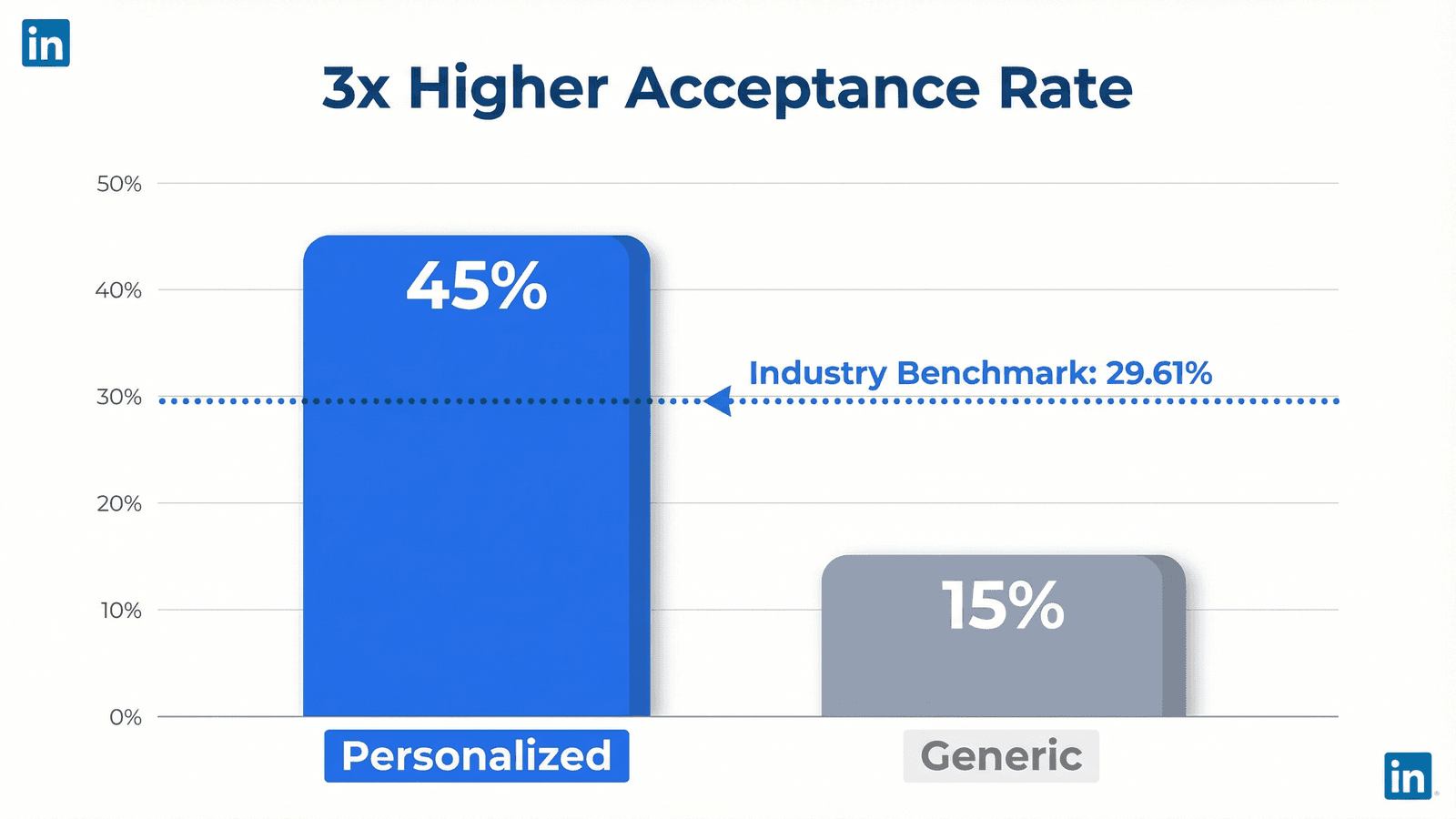
The benchmark acceptance rate? Just 29.61%. Nearly 7 out of 10 connection requests get ignored or rejected. Sound familiar? The warm vs cold outreach data tells a similar story across all channels.
But here's what I want you to walk away with: the secret to higher acceptance rates isn't perfecting your template. It's connecting with people who already know who you are. WHO you reach out to matters far more than WHAT you write.
1) What Is a Good LinkedIn Connection Request Acceptance Rate?
Let me give you a straight answer.
A LinkedIn connection request acceptance rate is the percentage of your invitations that recipients accept. According to Expandi's 2025 analysis of over 20 million outreach attempts, the benchmark is 29.61%.
That number varies by industry. Tech professionals accept around 35% of requests. Healthcare hovers at 28%. Finance folks? They're the toughest crowd at roughly 25%. (And yes, I learned that one the hard way chasing CFOs.)
| Industry | Acceptance Rate | Notes |
|---|---|---|
| Technology | 35% | Most open to networking |
| Healthcare | 28% | Moderate openness |
| Finance/Banking | 25% | Most selective |
If you're hitting 50% or higher, you're crushing it. That's where finding warm leads through social engagement gets you.
But here's the uncomfortable truth I had to accept: if you're consistently below 30%, your targeting is probably the problem. Not your copy. I spent months tweaking my LinkedIn connection request message when I should've been asking a different question entirely. Am I reaching out to the right people?
2) Why Most LinkedIn Connection Request Messages Fail (The 3-Second Truth)
Here's the thing. People don't read your LinkedIn connection request message carefully.
They glance at your photo, skim your headline, catch the first few words. Then they decide. Done.
Psychologists call this thin-slice decision making. It's how we make snap judgments based on limited information. On LinkedIn, that process takes 3-7 seconds according to Closely's research. Nerve-wracking when you think about it.
So what determines whether someone hits Accept or Ignore? Recognition.
Personalized connection requests achieve a 45% acceptance rate compared to just 15% for generic ones. That's a 3x difference.
But here's where most people get it wrong: personalization doesn't mean mentioning their job title or company name. That's table stakes. True personalization means referencing something real. Their recent post. A comment they left. A webinar you both attended.
Something that makes them think, "Oh, I know this person." Or at least, "This person actually paid attention." These are the buyer intent signals that separate warm prospects from cold ones.
Whether you track engagement manually or use tools like Guffles to extract LinkedIn post engagers, the principle is the same: connect with people while their engagement is fresh. That recognition factor separates a 15% acceptance rate from a 45% one.

3) The 72-Hour Engagement Window for LinkedIn Connection Request Messages
Timing matters more than most people realize. I wish I'd figured this out sooner.
The 72-Hour Engagement Window is the optimal timeframe for reaching out after someone engages with content. Based on data from our work at Guffles with 200+ B2B companies, reaching out within 72 hours increases response rates by 5-7x compared to waiting a week. The engagement context is still fresh. This is the core of turning LinkedIn engagement into leads.
Why does this work? Think about it. When someone comments on a post about sales automation on Tuesday, and you reach out on Wednesday referencing that comment, they remember. They're in that headspace. Your message feels relevant. Not random.
Wait a week? You're cold again. They've moved on. Your message about their "insightful comment" feels stale. Annoying, even.
The data backs this up. A Botdog analysis of 16,492 LinkedIn invitations found that 21% of acceptances happen within the first 60 minutes. And 88% of acceptances occur within 7 days. After 30 days? Requests are essentially dead.
What does this mean practically? Monitor posts in your industry. Note who engages. Reach out fast. According to Belkins' 2025 study, Tuesday has the highest reply rates at 6.90%, followed by Wednesday.
4) LinkedIn Connection Request Message vs No Message: The Real Answer
This debate comes up constantly. Should you include a LinkedIn connection request message or send blank?
Here's the honest answer based on data: it depends on your goal. I know, not the definitive answer you wanted. Stay with me here.
Expandi's research shows acceptance rates are nearly identical. 26.42% with a message. 26.37% without. Basically a wash.
But here's the catch. If you want conversations (not just connections), personalized messages boost reply rates from 5.44% to 9.36%. That's a 72% improvement according to Belkins' 2025 study. Huge difference.
| Metric | With Message | Without Message |
|---|---|---|
| Acceptance Rate | 26.42% | 26.37% |
| Reply Rate | 9.36% | 5.44% |
| Improvement | +72% | Baseline |
Source: Expandi 2025, Belkins 2025
So here's how I think about it:
- Just want to connect? Blank requests work fine for warm leads who recognize you.
- Want to start a conversation? A personalized message is mandatory.
- Sending a generic template? You're better off sending nothing. Seriously. A bad template is worse than no message.
When I ran demand gen at my last startup, I tested this extensively. Warm leads who'd engaged with our content accepted blank requests at 50%+. Cold prospects needed thoughtful messages just to crack 25%. The warmth of the lead changes everything.
5) 5 LinkedIn Connection Request Message Templates That Actually Work
These LinkedIn connection request message templates work because they follow the principles above.
They're specific. They reference something real. And they give a clear reason to connect. For more LinkedIn lead generation tips, check out our complete guide.
Template 1: Recent Post Engager
"Loved your comment on [Specific Person]'s post about [topic]. Your point about [their specific insight] resonated. Would love to connect and trade notes."
Why it works: You're referencing something they did. Recognition triggers acceptance. Simple as that.
Template 2: Shared Connection
"I see we're both connected to [Mutual Connection]. I'm working on [relevant topic] and noticed your expertise in [their specialty]. Happy to connect?"
Why it works: Social proof from mutual connections builds instant trust.
Template 3: Same Event/Webinar
"Just caught your question during the [Event Name] webinar. Great point about [topic]. Would love to stay in touch."
Why it works: Shared experiences create immediate common ground. Works like a charm.
Template 4: Content Value Add
"I noticed you're focused on [their area]. Just published something on [related topic] that might be useful. Happy to share if interested."
Why it works: Leading with value, not a pitch. Generosity gets accepted.
Template 5: Industry Peer
"Fellow [role] here. Following your work on [specific project/content]. Always looking to connect with others in [shared challenge]."
Why it works: Peer-to-peer feels less transactional. More human.
How to Personalize at Scale
Real talk: here's the problem I ran into. Manual personalization caps you at 5-10 posts per week. Researching each prospect takes 3-5 minutes. At 50 prospects, you're looking at 4+ hours just on research. Exhausting.
The challenge? Tracking engagement across dozens of posts is brutal. Tools like Guffles let you paste a LinkedIn post URL and extract every engager. Filter by ICP criteria (title, company size, industry), and you've got warm leads ready to connect. At $79/month, it's a fraction of Apollo's $300+ price tag.
6) Common Mistakes That Tank Your Acceptance Rate
After 8 years of doing this, I've made every mistake in the book. Probably twice.
Mistake 1: Using "I'd like to add you to my network"
This is LinkedIn's default. It screams "I didn't care enough to write something." Generic requests see roughly 15% acceptance. Ouch.
Mistake 2: Pitching in the connection request
Nothing tanks acceptance faster than "I'd love to show you how we can help..." Just don't. Save the pitch. Get accepted first.
Mistake 3: No clear reason to connect
Why should they care? "I noticed we're both in sales" isn't a reason. "I saw your approach to cold outreach in [specific post]" is. See the difference?
Mistake 4: Incomplete profile
No photo? Missing headline? Bare summary? You're starting with a credibility deficit. Remember that 3-7 second decision? They scan your profile, not just your message.
Mistake 5: Connecting with 3rd-degree strangers cold
Without mutual connections or shared context, you're basically a cold caller. Acceptance rates plummet.
Mistake 6: Sending too many too fast
LinkedIn allows roughly 100-200 requests per week depending on your account. Push past that and you'll trigger restrictions. Start with 20-30 per day to stay safe. Trust me on this one.
Frequently Asked Questions
What is a good LinkedIn connection request acceptance rate?
A good LinkedIn connection acceptance rate is 30% or higher. The industry benchmark is 29.61% according to Expandi's 2025 data. Warm targeting achieves 50%+ acceptance rates.
Should I send a message with my LinkedIn connection request?
Send a personalized message if you want conversations. Acceptance rates are similar with or without messages, but personalized messages boost reply rates by 72%.
How long should a LinkedIn connection request message be?
Keep your LinkedIn connection message under 300 characters. Aim for 2-3 sentences with a specific reason for connecting.
Why do LinkedIn connection requests get ignored?
Connection requests get ignored due to generic messages, pitching, incomplete profiles, or no clear reason to connect. Personalized requests achieve 3x higher acceptance.
The 72-Hour Engagement Window Framework
- Connect with warm leads who've engaged with relevant content (45% vs 15% acceptance)
- Reach out within 72 hours of engagement for 5-7x better response rates
- Reference something specific (their post, comment, or shared experience)
- Keep messages under 300 characters with a clear reason to connect
Stop Sending Cold Connection Requests
Look, I spent years chasing the perfect LinkedIn connection request message template. Honestly? It was the wrong focus. And I'm a little embarrassed it took me that long to figure out.
The real game-changers are simpler: connect with people who recognize you. Reach out within 72 hours of engagement. Give a specific reason for connecting.
Stop perfecting your message. Start connecting with people who've already engaged with relevant content. A mediocre message to a warm lead beats a brilliant message to a cold prospect every time. Every. Single. Time.
Ready to stop sending cold connection requests? Guffles offers $150 in wallet credits to test intent-based lead discovery. Paste a post URL, find your warm leads, and see what a 50%+ acceptance rate feels like. At $79/month, it's built for sales teams who'd rather work smarter than harder.
A mediocre LinkedIn connection message to a warm lead beats a brilliant message to a cold prospect every time. WHO you connect with matters more than WHAT you write.
Ready to Find Your Warm LinkedIn Leads?
Get $150 in wallet credit to test engagement-based lead discovery on your actual prospect list. No commitment required.
7-day free trial • Cancel anytime