
Your LinkedIn poll got 73 votes. Great. Now what?
Most people treat polls as engagement content and move on. Big mistake. (And yes, I made it too for way too long.) Every vote is a prospect telling you exactly what they care about. Unlike likes or comments, you can see exactly who voted and which option they picked. That's intent data hiding in plain sight.
1) Why Poll Votes Are Warm Signals (Not Vanity Metrics)
I used to look at my poll results and think, "Nice, good engagement." Then I'd move on to the next post. It took me embarrassingly long to realize I was leaving money on the table.
Here's what changed my thinking: a poll vote isn't passive. It's someone actively making a choice about a topic. They saw your question, considered the options, and clicked. That's more intent than a casual scroll-by like. Way more.
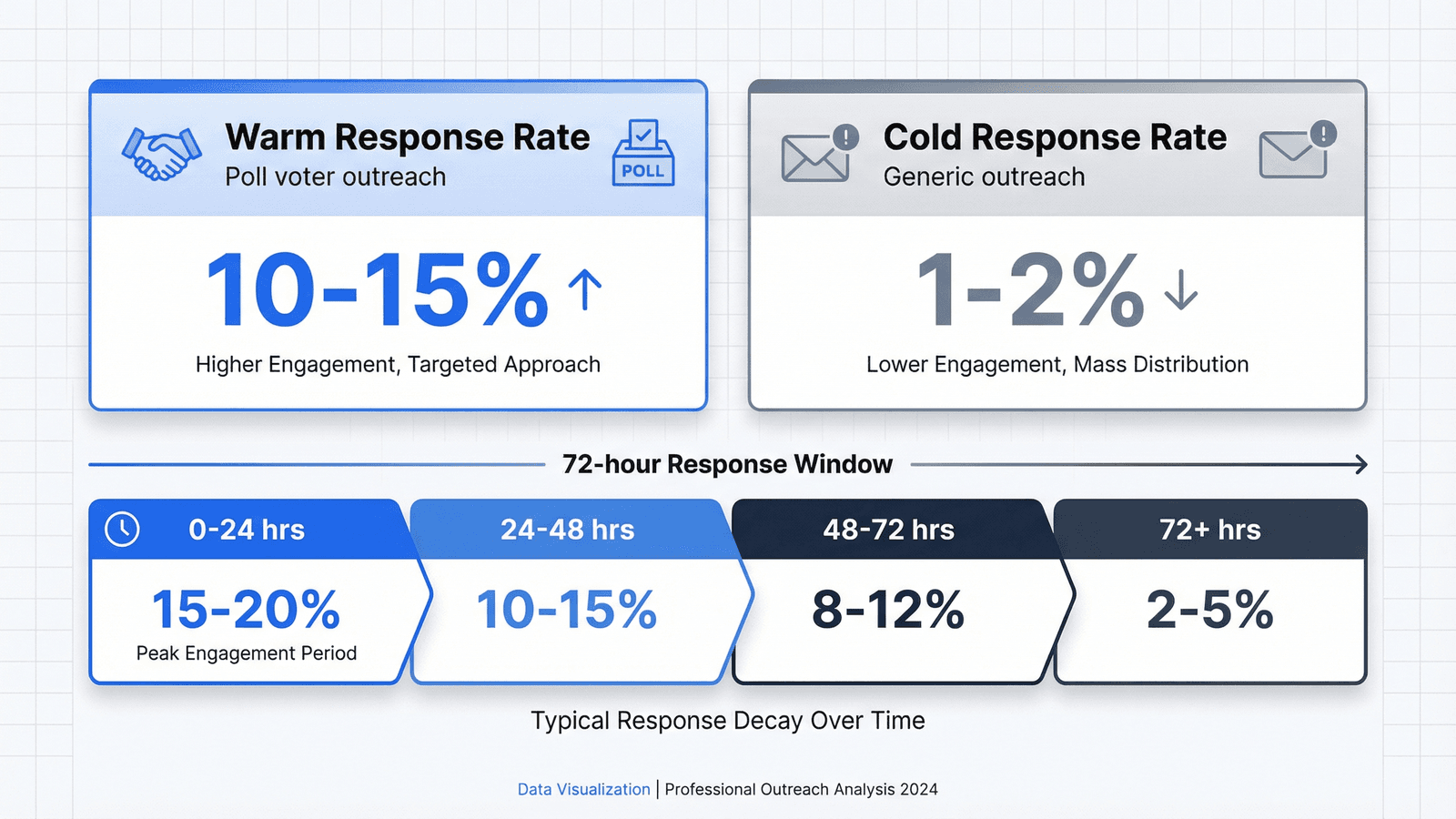
According to Expandi's 2025 State of LinkedIn Outreach report, warm outreach achieves 10-15% response rates compared to just 1-2% for cold outreach. Poll voters fall squarely in that warm category.
Think about it. When someone votes on your poll asking "What's your biggest challenge with LinkedIn prospecting?", they're telling you their pain point. Right there. No guessing. That's intel most cold outreach never has. Poll votes are essentially buyer intent signals in disguise.
Social Insider's 2025 benchmarks show brands increased their usage of LinkedIn polls by 55% year-over-year, and polls achieve a 4.40% average engagement rate. That's roughly double regular posts. But here's the thing: the engagement isn't the prize. The list of people who told you what they care about? That's the prize.
Every poll vote is a hand raised. Someone actively signaling what matters to them. The question is: what are you doing with that signal? Understanding how to use social engagement signals for warm leads can transform your entire prospecting approach.
2) Can You See Who Voted on LinkedIn Polls?
Let me answer this directly: Yes, poll creators can see exactly who voted and which option each person selected.
LinkedIn polls are NOT anonymous to the creator. You can click on the vote count and see every single voter, including their profile and their choice. Other voters can't see this. Only you.
Here's what that means for lead generation: you're not just getting engagement data. You're getting segmented engagement data. If your poll asks about budget challenges and someone votes "We don't have the tools we need," you know exactly what to talk about in your outreach. No guessing. No hoping.
And here's something most people don't realize: voting on a poll doesn't show up on the voter's activity feed. People vote more honestly when they know it's not broadcast to their network. That makes the data even more valuable. (I've noticed people vote for options they'd never admit to publicly.)
Whether you click through each voter manually or use extraction tools like Guffles, the principle stays the same: poll voters have told you exactly what they care about. That's intel you can't get from a cold prospect list.
3) The 4-Step Poll-to-Lead Process
I've run over 50 LinkedIn polls in the past year. Here's the exact process I use to turn those votes into conversations.
Step 1: Create a Poll That Reveals Pain PointsForget preference polls like "Coffee or tea?" Fun, sure. But useless for sales. Instead, ask questions that expose challenges. "What's your biggest obstacle to hitting quota?" or "Where does your lead gen process break down?" Use 3-4 options, and always include "Other - tell me in comments" to drive extra engagement.
Step 2: Engage While the Poll RunsDon't post and ghost. When people comment, reply. Ask follow-up questions. This boosts visibility through the algorithm and starts warming up relationships before you even reach out. I try to respond to every comment within 2 hours. (Honestly, it's exhausting some days, but the payoff is real.)
Step 3: Extract Voter Data Within 24 HoursThis is where most people stall. The manual method: click on the vote count, open each profile in a new tab, note their info. It works, but you'll cap out at maybe 5-10 leads per hour. For a poll with 75 votes, that's a lot of clicking. Ask me how I know.
Step 4: Send Personalized Outreach Based on Vote ChoiceThis is the magic. Instead of a generic "Hey, saw you voted on my poll," reference their specific choice. "Hey Sarah - noticed you voted that budget is your biggest challenge. Curious, is that about headcount or tools?" That shows you paid attention. Warm. Relevant. Specific.
4) The 72-Hour Engagement Window: Why Timing Matters
Here's something I learned the hard way: a poll voter from last week is basically a cold lead.
I ran a poll that got 89 votes. Great numbers. But I was traveling, got distracted, and didn't follow up for 10 days. When I finally reached out? Crickets. Maybe 2% response rate. Same people, same message template, but the context had faded. Frustrating.
The data backs this up. According to LeadAngel research, leads contacted within 5 minutes are 21x more likely to convert than those contacted after 30 minutes. Email Analytics found that after 10 minutes, you lose 50% of potential lead value. Brutal, right?
For LinkedIn poll lead generation specifically, I've found this framework works:
- 0-24 hours: Golden window. They just voted, the topic is fresh. Expect 15-20% response rates.
- 24-48 hours: Still warm. Move fast. Expect 10-15% response rates.
- 48-72 hours: Last chance for context. Expect 8-12% response rates.
- 72+ hours: Context has faded. You're basically cold again. Expect 2-5%.
This is where the extraction bottleneck hurts. Manual clicking takes hours. By the time you've extracted 50 voters, the first ones are already cooling off. I hate that feeling.
At $79/month, Guffles extracts poll voters, filters by ICP criteria, and surfaces contact data. All within that critical 24-hour window. Compare that to Apollo at $300+ or ZoomInfo at $500+. If you're serious about poll-based prospecting and running multiple polls per month, the math works out fast. For more context on these numbers, check out our warm vs cold outreach data breakdown.
5) Follow-Up Messages That Convert Poll Voters
The worst thing you can do is send a generic "Hey, saw you voted on my poll!" That tells them nothing. Sounds like a bot. They'll ignore it.
Here's the framework I use:
1. Reference the poll AND their specific vote "Noticed you voted that [specific option] is your biggest challenge with LinkedIn prospecting."
2. Ask about their experience "Curious - is that something you're actively trying to solve right now?"
3. No pitch in the first message Just start the conversation. The pitch comes later, if ever. (Real talk: sometimes I never pitch at all. Some conversations are just relationship-building.)
Example connection request: "Hey [Name] - saw you voted 'not enough qualified leads' on my poll about sales challenges. That's what I hear the most. What's been the biggest roadblock for you?"
For more templates and data on what works, check out our guide on LinkedIn connection request messages.
See how that's different from cold outreach? You're not guessing what they care about. They told you.
What NOT to do:- Don't pitch your product in the first message. Ever.
- Don't use generic templates that don't reference their vote.
- Don't wait more than 72 hours. The context fades fast.
- Don't spam everyone who voted. Filter for ICP fit first.
Sound familiar? If you've been treating poll voters like a cold list, you're burning warm leads. I've seen it happen. It's painful to watch. For more on turning LinkedIn engagement into leads, we've got a deep dive on that.
Frequently Asked Questions
How many options should a LinkedIn poll have?
Use 3-4 options for maximum engagement. Include an "Other (tell me in comments)" option to drive comments and boost algorithm visibility. Each option is limited to 30 characters.
What is a good LinkedIn poll engagement rate?
Polls achieve 2x the engagement of regular posts. In 2025, polls have a 1.64x reach multiplier and average 4.40% engagement rate, according to AuthoredUp research.
How long should a LinkedIn poll run?
3 days is the sweet spot for lead generation. It gives the algorithm time to circulate the post while creating urgency. Longer polls risk delayed follow-ups and fading context.
Can you export LinkedIn poll voters to a spreadsheet?
LinkedIn has no native export. You can manually click through voters, or use tools like Guffles or PhantomBuster to export voter profiles with contact data automatically.
Do poll votes appear on voters' activity feeds?
No. Voting on a poll is invisible to the voter's network. Only the poll creator can see individual votes, which makes people vote more honestly.
Poll-to-Lead Quick Action Steps
- Create a poll asking about pain points, not preferences (3-4 options + "Other")
- Engage actively in comments while the poll runs
- Extract voter data within 24 hours of the poll closing
- Send personalized outreach referencing their specific vote choice
- Focus on starting conversations, not pitching products
Stop Leaving Poll Engagement on the Table
Look, poll votes are warm signals hiding in plain sight. You've now got the complete system: create polls that reveal pain points, extract the voters, follow up within 72 hours, and reference their specific choice. Not complicated. Just requires follow-through.
Start with manual extraction if you're just testing the waters. It's free and you'll learn the workflow. But when you're ready to scale beyond one or two polls per month? The manual approach caps out fast. Trust me on this one.
Guffles offers $150 in wallet credits to get started. No contracts. No enterprise sales calls. Just paste a poll URL, extract the voters, filter by your ICP, and get the contact data you need to actually follow up.
Those 73 poll votes? They're not just engagement metrics. They're 73 people who told you what they care about. Now you have a system to do something with it.
Get $150 in wallet credits. Extract poll voters, filter by ICP, and turn engagement into pipeline.
Turn Poll Engagement Into Pipeline
Extract LinkedIn poll voters, filter by ICP, and follow up while the context is still warm. $150 in wallet credits to start.
7-day free trial • Cancel anytime