
You've got 50 leads and 4 hours. Who do you call first?
If you're like 66% of salespeople, you go with your gut. That worked when you had 10 leads a week. It breaks down when you have 50.
I've watched SDRs waste entire afternoons on leads that were never going to convert. Meanwhile, hot prospects went cold in their inbox.
Lead prioritization is the process of ranking sales prospects by their likelihood to convert. It uses criteria like ICP fit, engagement signals, and buying intent to determine who gets called first.
Here's a 5-step framework that takes the guesswork out without taking your budget with it.
Why Most Lead Prioritization Fails
Here's the thing most prioritization advice gets wrong: it assumes you have time to think about each lead. You don't.
According to Gartner, 83.4% of SDRs fail to consistently hit quota each month. And Spotio found that 44% of companies don't have any lead scoring system at all. That's a lot of people winging it.
The common mistakes? Prioritizing by company size alone (guilty). Ignoring timing completely. Treating all leads as equally worthy of your attention.
Sound familiar?
Here's what burns the most. Research from Peak Sales Recruiting shows 35-50% of sales go to the vendor that responds first.
So while you're carefully analyzing whether that Fortune 500 lead is worth your time, your competitor is closing someone who was actually ready to buy.
Stop treating all leads equally. Some deserve 5 minutes of your day. Others deserve 5 seconds.
Step 1: Define Your ICP Criteria
Before you add any fancy signals, nail the basics. Who are you actually looking for?
In my experience helping 200+ companies, the teams that struggle with prioritization usually can't answer three simple questions:
- What titles do you sell to?
- What company size is your sweet spot?
- What industries convert best?
Create a simple 1-5 fit score. Here's what I use:
- 5 (Perfect ICP): VP Sales at 200-person SaaS company in your target industry
- 4 (Strong match): Director of Sales Ops at 150-person tech company
- 3 (Okay fit): Sales Manager at 500-person company, adjacent industry
- 2 (Weak fit): Account Executive at 50-person startup
- 1 (Non-fit): Marketing Intern at 10-person agency
The goal isn't perfect precision. It's fast triage.
A 1 or 2? Don't waste another second. A 4 or 5? Now we're talking.
But here's what I learned the hard way (several times, actually): fit alone isn't enough.
A perfect ICP match from last month beats nothing. But a lukewarm fit who engaged yesterday? That's where it gets interesting. And that's why we need Step 2. For more on identifying buyer intent signals that show prospects are ready to buy, check out our detailed guide.
Step 2: Create Your ICP Engagement Score
Now for the part that actually changed how I prioritize leads.
Traditional lead scoring puts all the weight on who someone is. Job title. Company size. Industry. That's necessary. But not sufficient.
Why? Because a perfect fit who's not thinking about your problem right now isn't worth much.
The ICP Engagement Score combines who someone is (demographics) with what they've done (engagement). A perfect demographic match with no engagement scores lower than an okay fit who's actively engaging with competitor content.
Here's the formula:
ICP Engagement Score = (Demographic Fit x 0.4) + (Firmographic Fit x 0.3) + (Engagement Strength x 0.3)
So if someone scores 4/5 on demographics (80 points), 4/5 on firmographics (80 points), and 5/5 on recent engagement (100 points):
(80 x 0.4) + (80 x 0.3) + (100 x 0.3) = 32 + 24 + 30 = 86 points (hot lead)
Score interpretation:
- 80-100: Hot lead - call today
- 60-79: Warm lead - add to your sequence
- 40-59: Lukewarm - nurture before outreach
- Below 40: Deprioritize
According to MarketingSherpa, organizations with lead scoring see 138% ROI versus just 78% for those without. That's not a small difference.
You can track engagement manually by checking LinkedIn notifications and keeping a spreadsheet. Works fine for small volumes. Learn more about finding warm leads through social engagement signals.
If you want to automate this, tools like Guffles can extract engagers from LinkedIn posts automatically and filter by ICP criteria. Either way, the scoring principle stays the same.
Step 3: Rank Leads by Signal Strength
Not all engagement is created equal. A comment on a competitor's post shows much stronger buying intent than a passive profile view.
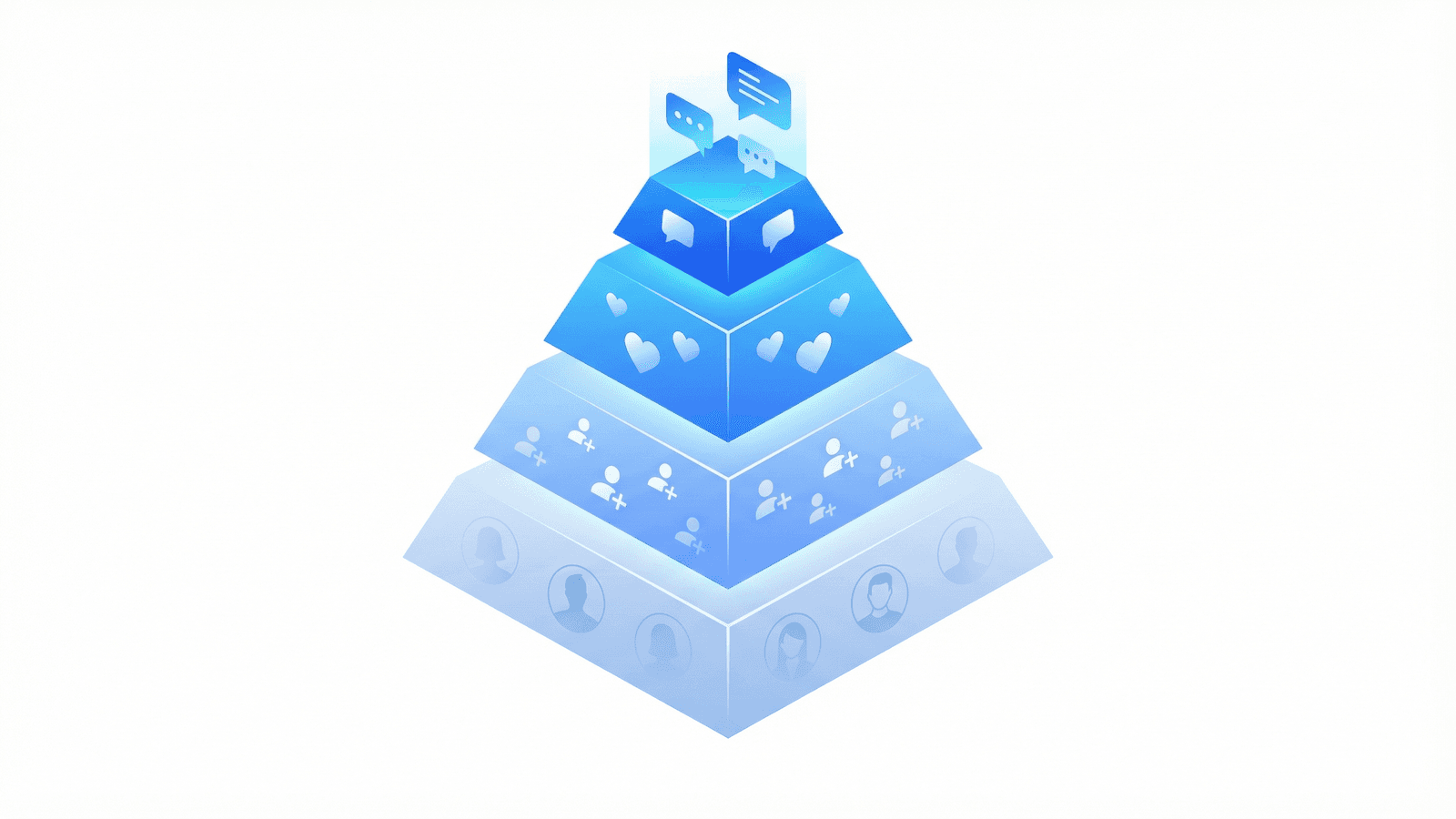
The Intent Signal Hierarchy ranks engagement types by buying intent strength. Here's the breakdown:
- Tier 1 (Highest intent): Comments on relevant industry posts
- Tier 2 (High intent): Likes on competitor or problem-aware content
- Tier 3 (Medium intent): Follows industry thought leaders in your space
- Tier 4 (Low intent): Passive profile views with no engagement
Someone who commented "We're struggling with exactly this!" on a post about sales productivity? That's Tier 1. Call them first.
Someone who liked your CEO's thought leadership post? Tier 2. Still warm, but less urgent.
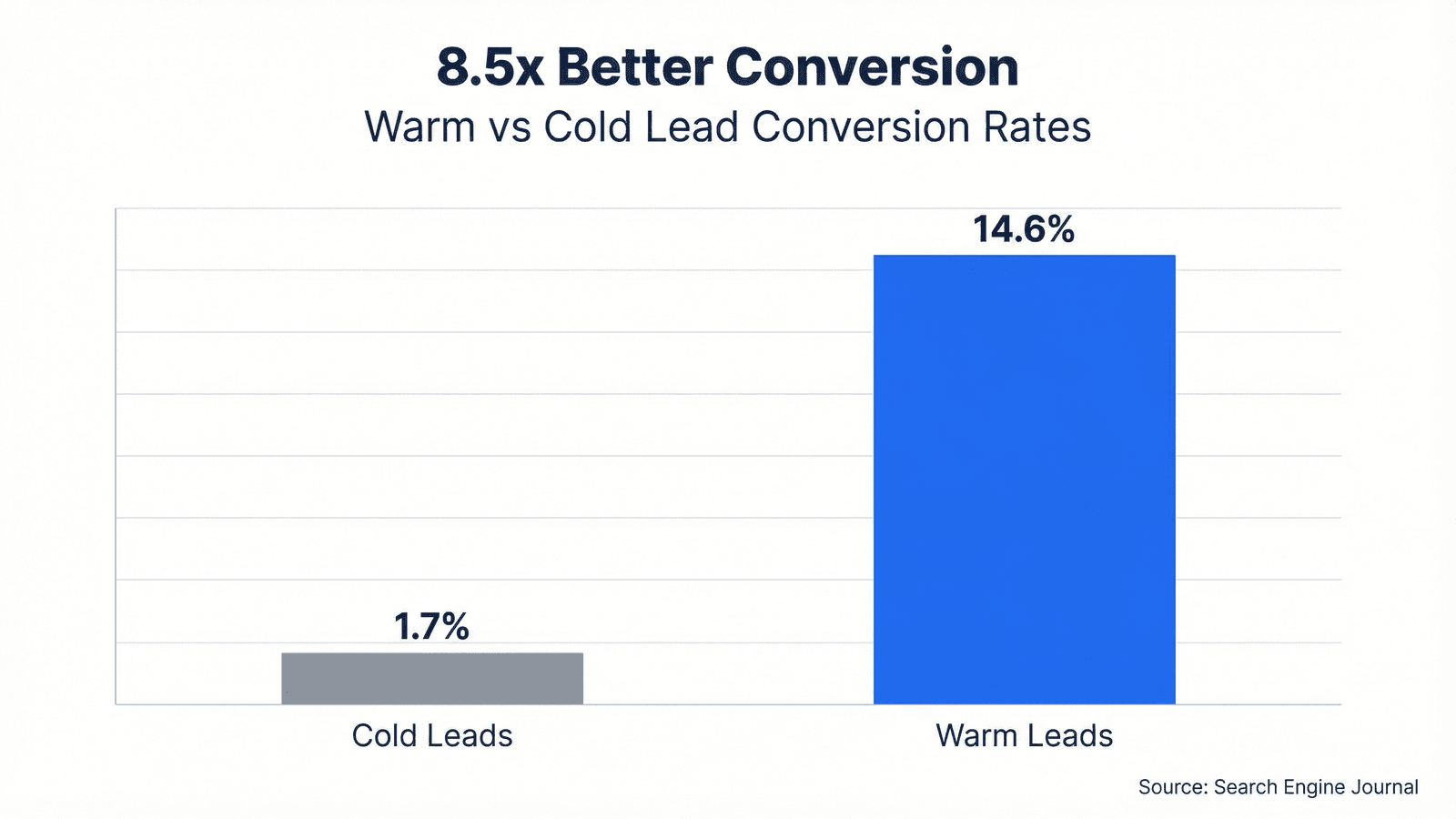
The data backs this up. According to Search Engine Journal, warm leads convert at 14.6% versus 1.7% for cold leads. That's 8.5x better. See our full warm vs cold outreach data breakdown for more details.
And the Lead Response Management Study found that companies responding within 5 minutes are 100x more likely to connect.
Recency matters too. A lot. Same signal from yesterday beats same signal from last month. Always.
The best leads aren't just good fits. They're good fits who are actively showing interest right now. Here's how to turn LinkedIn engagement into leads.
Warm Leads vs Cold Leads: The Data
| Metric | Cold Leads | Warm Leads |
|---|---|---|
| Response Rate | 1-2% | 10-15% |
| Conversion Rate | 1.7% | 14.6% |
| Sales Cycle | 90-180 days | 30-60 days |
Source: Search Engine Journal, Guffles Data
Step 4: Apply the 72-Hour Rule
Here's something that took me years to internalize: timing matters as much as score.
The 72-hour engagement window is the optimal timeframe for contacting a prospect after they show engagement. Our data shows that reaching out within 72 hours increases response rates by 5-7x compared to waiting a week.
The engagement context is still fresh in their mind.
The decay curve looks like this:
- 0-24 hours: 15-20% response rates (highest priority)
- 24-48 hours: 10-15% response rates
- 48-72 hours: 8-12% response rates
- After 72 hours: Drops to cold outreach levels
Practically, this means re-sorting your priority list daily by recency. That 85-point lead from last week? They might score lower than the 70-point lead who engaged yesterday.
But here's the problem with manual tracking. Real talk.
You can realistically monitor 5-10 LinkedIn posts per week. Maybe you check your notifications, note who's engaging, add them to a spreadsheet. It works. I've done it myself.
But if your ICP is engaging across 50 relevant posts in your industry? You're missing 80% of your opportunities. There's just not enough time.
Guffles solves this by extracting all engagers from any LinkedIn post and filtering by your ICP automatically. At $79/month versus $300+ for Apollo or $500+ for ZoomInfo, it's designed for teams who want intent data without enterprise pricing. Start with the $150 wallet credit to test it.
Step 5: Review and Refine Weekly
This isn't a one-time exercise. It's a system you build.
Every week, spend 30 minutes reviewing what worked:
- Which priority tiers actually converted?
- What ICP criteria predicted success?
- Which engagement signals correlated with closed deals?
After 4 weeks, you'll have real data to refine your model. Maybe you'll discover that Director-level titles convert better than VP-level in your market. Or that comments on competitor posts are 3x more valuable than likes.
Track three metrics that matter:
- Response rate by tier (Hot vs Warm vs Lukewarm)
- Conversion rate by tier
- Time-to-close by tier
According to Landbase, organizations see a 20% increase in sales productivity with structured prioritization.
And Gartner's Future of Sales report predicts that by 2025, 60% of B2B sales will transition from intuition to data-driven selling.
Don't be in the 40% still winging it. You're better than that. Once you've prioritized your leads, here's how to go about converting warm leads to customers.
Frequently Asked Questions
How do you prioritize sales leads?
Score leads on ICP fit plus engagement signals. Leads matching your ideal customer profile who have recently engaged with relevant content should be called first. Use a 1-5 scale for fit and check recency of engagement.
What is the best way to score leads?
Use the ICP Engagement Score: 40% demographic fit, 30% firmographic fit, and 30% engagement signals. This weights both who someone is and what they've done, prioritizing leads who match your target AND show active interest.
How do you know which leads to call first?
Call leads who engaged within 72 hours first. Comments on relevant posts show highest intent, followed by likes and follows. A recent engagement signal matters more than demographic fit from weeks ago.
What is lead prioritization?
Lead prioritization is ranking sales prospects by likelihood to convert. It uses ICP fit, engagement signals, and buying intent to determine who gets called first, helping sales teams focus time on the best opportunities.
How do you qualify leads quickly?
Ask three questions: Does their title and company match your ICP? Have they shown engagement signals? Is their company in a buying window? This takes under 60 seconds per lead.
Quick 5-Step Lead Prioritization Framework
- Define your ICP criteria with a simple 1-5 fit score
- Create your ICP Engagement Score (fit + engagement signals)
- Rank leads by signal strength using the Intent Signal Hierarchy
- Apply the 72-hour rule - recency beats score
- Review and refine weekly based on what actually converts
Start Prioritizing Smarter Today
Let's bring it together. Here are your five steps:
- Define your ICP criteria - Create a 1-5 fit score for fast triage
- Create your ICP Engagement Score - Weight fit at 70% and engagement at 30%
- Rank leads by signal strength - Comments beat likes beat views
- Apply the 72-hour rule - Recency matters as much as score
- Review and refine weekly - Let conversion data guide adjustments
Start with the framework. Try it manually for a week with a spreadsheet and your LinkedIn notifications. See what happens to your response rates.
If you find yourself wishing you could track more posts and catch more engaged prospects, Guffles offers $150 in wallet credit to get started.
Paste a LinkedIn post URL, see who engaged, filter by your ICP, and reach out while the context is still fresh.
The best leads aren't just the ones who look good on paper. They're the ones showing interest right now. Go find them.
Get $150 in wallet credit to test Guffles. Extract engagers from any LinkedIn post, filter by ICP, and reach out while they're still warm.
Turn LinkedIn Engagement Into Pipeline
Stop missing warm leads. Guffles extracts engagers from LinkedIn posts and filters by your ICP automatically. Get $150 in wallet credit to try it.
7-day free trial • Cancel anytime